سوال
fatal error occurred while trying to sysprep the machine windows 7
جواب
Load a command prompt with admin rights and type “net stop WMPNetworkSvc“, sysprep should run ok.
اکثرا با دستور بالا درست میشه فقط cmdرو با ران از ادمین رو اجرا کن و نیز دقیق بنویس
اگر خطا داد مراحل زیر رو انجام داده و سپس دوباره دستور بالا را اجرا کنید
در ضمن به نظرم بهتر است فایل sysprop رو با استفاده از cmd اجرا کنید به روش زیر
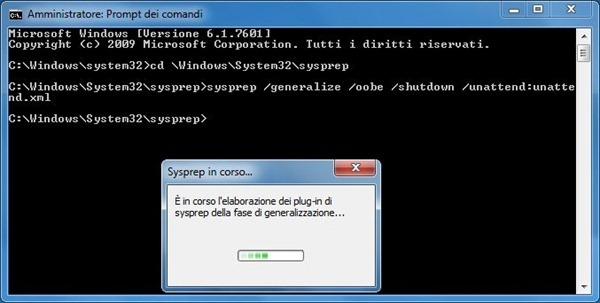
اگر نشد رجستری زیر رو رفتم حذف کردم و شد
Easiest way to fix this matter is removing the orphan key left in the registry by Microsoft Security Essential package.
Open the Registry Editor. The string to be removed from the registry is located in:
HKLMsoftwareMicrosoftWindowsCurrentVersionSetupCleanup

Identify the string:
2D153B43-11B4… C:program filesMicrosoft Security ClientMSESysprep.dll,DllSysprep_Cleanup
Because this is a protected string, you need to change the permission of the key to deleted it. From the Registry Editor select the key then go to menu Edit > Permissions.

Give the group Users Full Control permissions to the key then click OK.

Right click the registry key then select Delete option.

A warning message is shown. Click Yes to confirm key deletion.

The key is no longer listed.
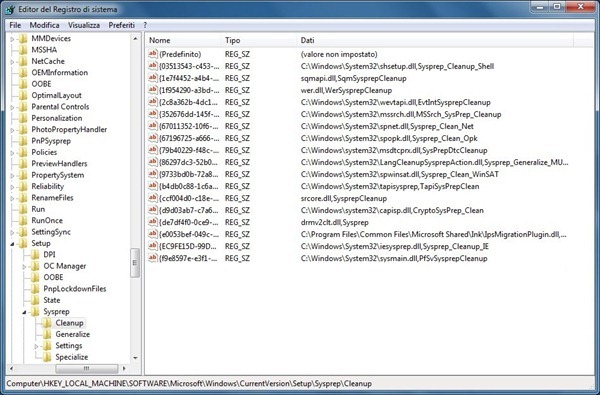
Launching the sysprep once again, the process runs smoothly.














دیدگاهتان را بنویسید